Seven years ago, coming out of business school, I met with about 300 people over the course of a year while looking for my next job. I thought that was a lot at the time.
This time, I started with a deep network I needed to activate. In roughly a month and a half, I've met with about 150 people. At that pace, it would be close to 1,200 conversations a year, roughly four times the pace of my earlier effort.
I hope I won't be searching for a job for a whole year. But even a few weeks at it made one thing clear: that kind of pace and volume requires a different operating system.
The meetings themselves are manageable. The harder problem is what happens after them: keeping track of who I spoke with, what we discussed, what I promised, and what should happen next. The unit of work is not an email or a contact record. It is the loop from conversation to context to next action. AI agents make that loop easier to run at volume.
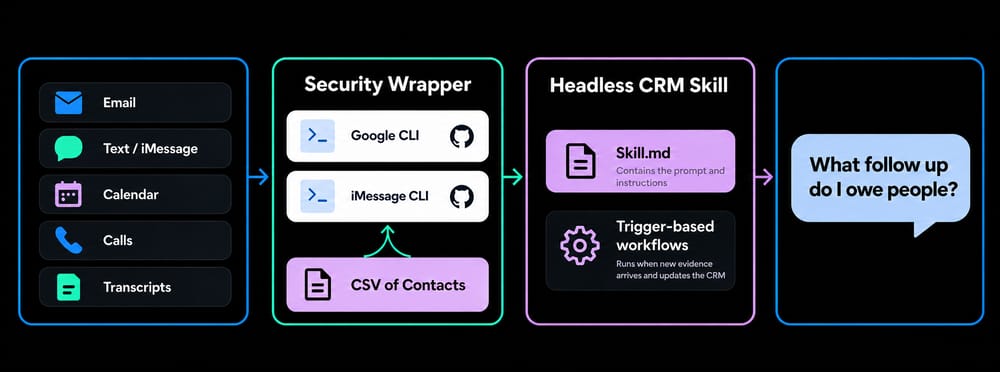
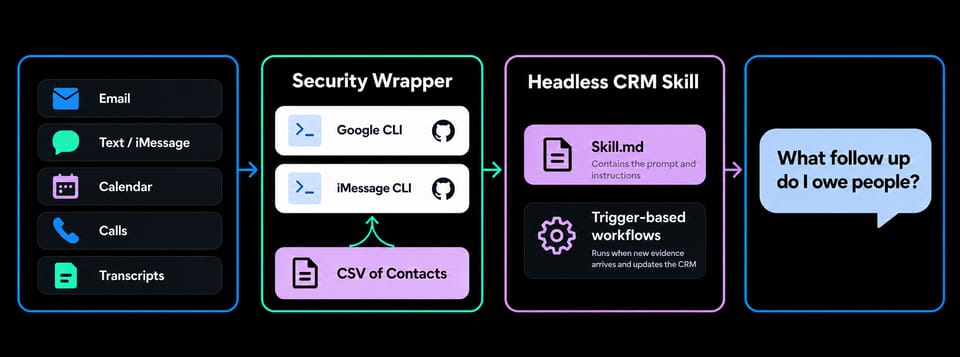
The system is called a Headless CRM. Its source of truth is a CSV file rather than a traditional CRM application like HubSpot or Salesforce. I mostly interact with it by talking to Codex. I can ask my agent to build whatever dashboard I need or query whatever information I'm looking for.
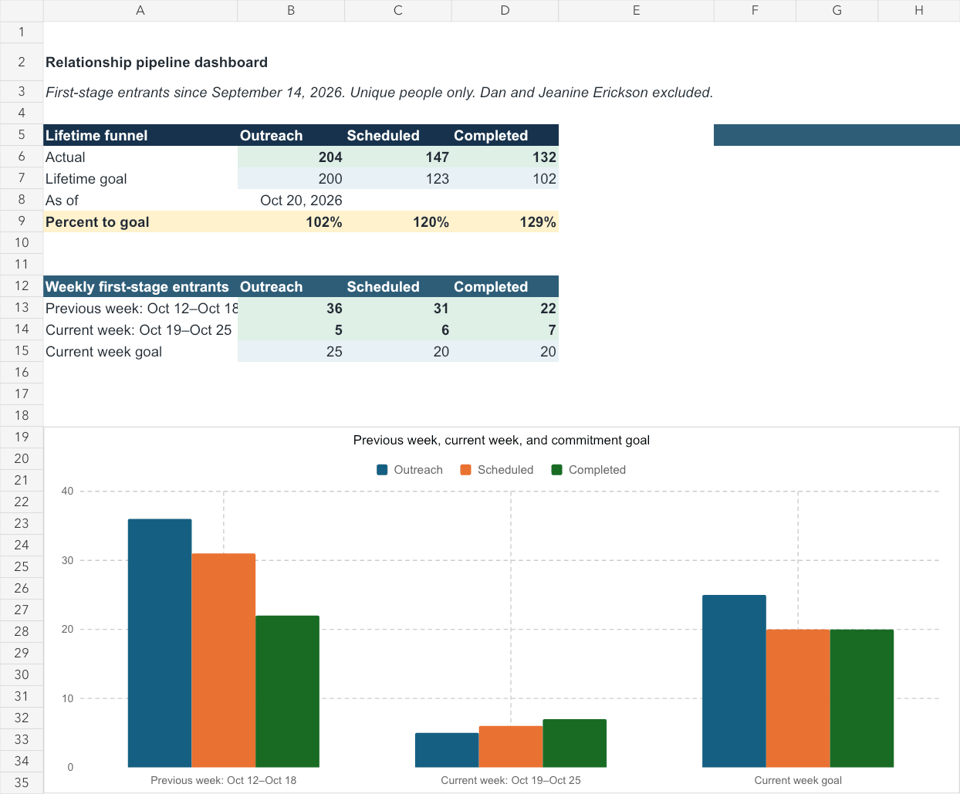
Relationship pipeline dashboard showing outreach, scheduled, and completed conversations
The term "headless" is also showing up in a broader conversation about software. In the October 10 episode of the All-In Podcast, Chamath Palihapitiya describes software becoming "headless": its capabilities can be wrapped in agent tools and connected through MCP to other experiences instead of being accessed only through a fixed interface. My CRM is a version of that idea built around my own work and relationships. The interface is a conversation with Codex.
I didn't invent the idea of a Headless CRM. I learned it from Khe Hy. In his June 11 blog post, I built a "headless CRM" in Codex, he describes connecting Gmail and iMessage to Codex, encoding relationship cadences in a skill, and running a scheduled review. Hy's goal was to use AI to create more opportunities for generosity and connection.
That post gave me both the idea and the prompts I used to build my own Headless CRM.
My version became a test of a bigger question: can personal software help me handle much more relationship activity without making the relationships feel transactional?
How I stood it up
I started with a stale Google Sheet of contacts I had accumulated over the years. I connected it to the places where fresher information lived: Gmail, calendars, iMessage, and call history. Once connected, the system cleans up duplicate names, fills in missing phone numbers and email addresses, and preserves details—like the names of children or dogs—that make relationships easier to remember.
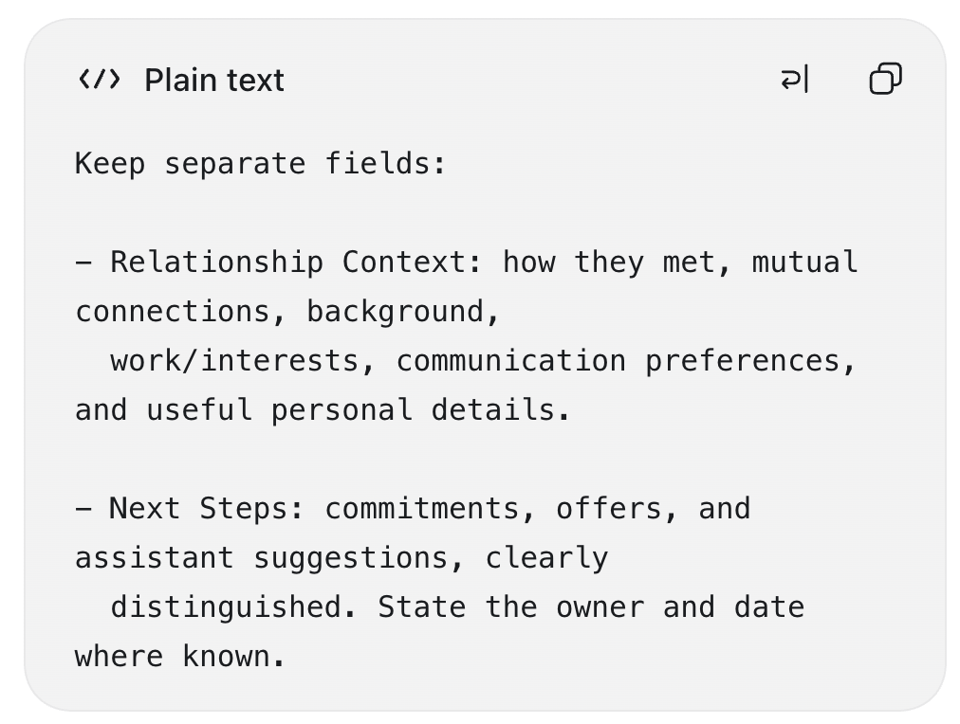
I turned those decisions into a reusable Headless CRM skill: instructions Codex follows when adding a person, reading a transcript, or updating a follow-up. The skill tells it to keep relationship context separate from next steps. Context can include how we met, mutual connections, interests, and useful personal details. Next steps capture commitments, offers, and suggestions, with the owner and date where known.
Headless CRM skill: separate relationship context from next steps
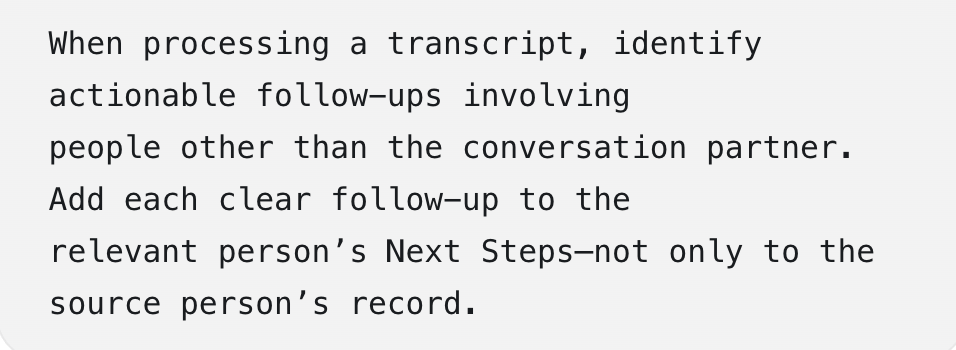
The skill also tells Codex to look for actionable follow-ups involving people other than the person I spoke with, and to add each clear follow-up to the relevant person's record. That distinction matters when one conversation opens a path to someone else. The connection should not disappear inside the original meeting note.
Headless CRM skill: connect follow-ups to the relevant person
Codex followed the setup in Khe Hy's post, using the `gog` CLI to connect Gmail, Drive, and Calendar through Google's APIs. That meant creating a Google Cloud project and Desktop OAuth client, then limiting the Gmail connection to read-only access. The Terminal commands were:
brew install openclaw/tap/gogcli gog auth credentials set ~/Downloads/headless-crm-credentials.json gog auth add YOUR_GMAIL_ADDRESS --services gmail --gmail-scope readonly gog auth list --check
Codex set up iMessage separately through the `imsg` CLI. The commands were straightforward; the important work was deciding what Codex was allowed to read, what it should preserve, and what still required my judgment.
The goal was not to automate everything at once. It was to make sure the system could recognize the right person and preserve the right evidence before it started making suggestions. Once that foundation was reliable, I built a dashboard and more workflows around it. The design principle was simple: the system could do the remembering and reconciliation; I would still decide what the information meant and what to do with it.
From a nightly sweep to practically real-time workflows
At first, the system scanned everything once a day and gave me a nightly review. It was useful, but it asked one large process to do too much at once: read across my sources, reconcile what had changed, identify commitments, prepare meeting context, and decide what deserved my attention. The improvement was not a more elaborate daily prompt. It was a change in architecture.
I eventually realized I needed smaller workflows, each doing one job well and running when the information was fresh. The ongoing workflows are relatively light on token use. Most of the cost was in building and tuning them, so I had to pace the work.
Today, those workflows are trigger-based rather than scheduled sweeps. When new evidence arrives—a message, calendar event, transcript, meeting note, or call record—the relevant workflow runs and updates the CRM when the evidence is clear. A meeting workflow can connect a calendar event to its transcript or notes, while call history can confirm that a conversation happened and the transcript captures what we discussed.
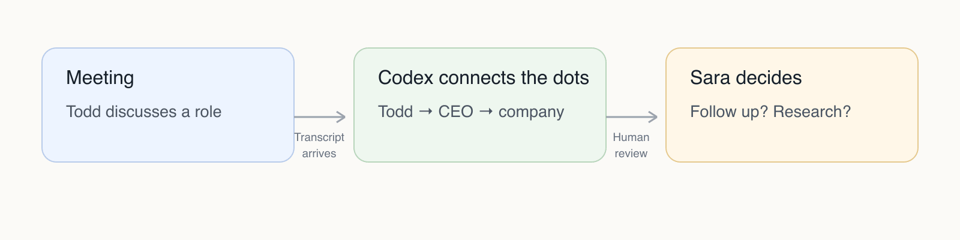
Here is what that looks like in practice. Last week I met with Todd, a recruiter, about a role. Afterward, he suggested that I interview. When the transcript arrived, Codex matched it to Todd's CRM record and connected the conversation to the CEO and company behind the opportunity. It proposed adding the CEO to the CRM and preparing a research brief on the company. I asked Codex to take that one step further: turn the research into a CEO interview prep guide and draft a follow-up email to Todd. Codex prepared both, but it did not contact the CEO or send the email. I reviewed and shaped the materials myself. That boundary matters: the system can prepare the next move, but I decide whether to make it.
From meeting to next action
That same pattern now repeats throughout the day. After each meeting, Codex now handles much of the work of recording it in the CRM and capturing the follow-up. Over time, each person's record becomes more specific without requiring me to reconstruct every conversation from scratch.
The CRM now stays current throughout the day instead of waiting for a nightly sweep. I still do a broader weekly review after activity has accumulated, but I no longer depend on one nightly report to tell me what changed.
What I actually built
I started out thinking I was building a better contact database.
What I built is closer to a relationship operating system. More precisely, it is a loop: conversations create context, context makes the next conversation better, and the next conversation gives the system something new to learn. Its job is to keep my own attention from getting scattered.
Each conversation leaves behind a little usable context for the next one. Each review improves the rules for what to retain, what to surface, and what to leave alone. Over time, the system gets better at surfacing the context I actually use, and fewer good intentions disappear between conversations.
The point is not to know everything about everyone. It is to keep the few details that help me be fully present in the next conversation.
I'm thinking about publishing a version of the skill and setup notes on GitHub. If that would be useful, tell me which you'd most like to see: the skill, the setup notes, the trigger-based workflows—or all three.